


PMED - Preço de Procedimento
0.00.00 Reviews
App Specs
- Version
- 17.7
- Updated On
- License
- $4.99
- Downloads
- 10,000+
- Developer
- OAZEZ Software & Tecnologia
- Categories
- Medical
- Platform
- Android
Screenshots
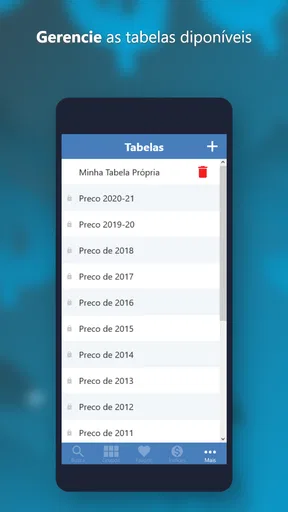
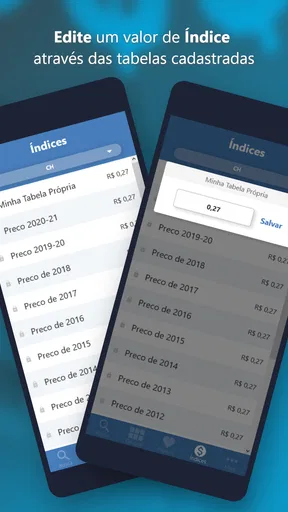
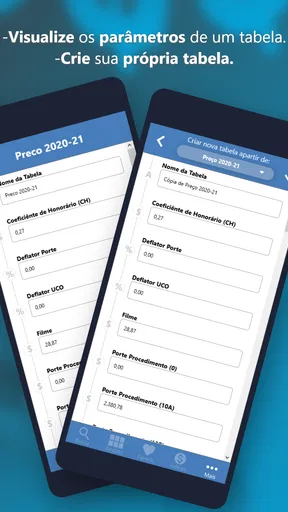
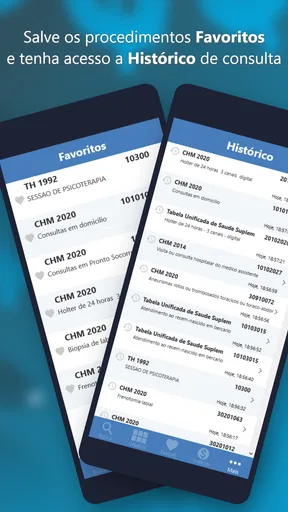
 Analysis by AppCompare
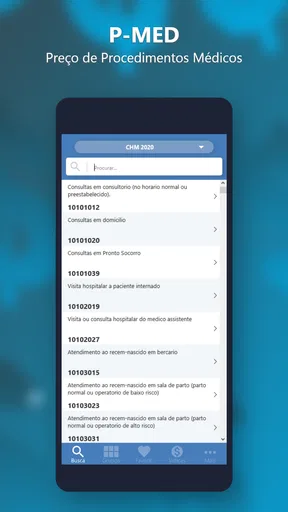
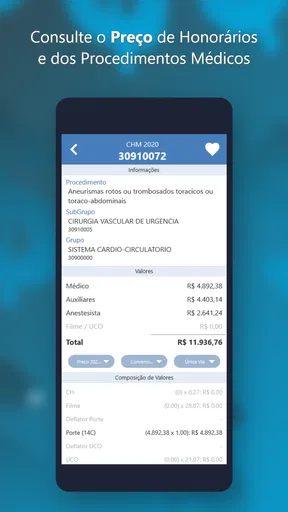
When I look at a medical pricing tool, I care less about a polished sales pitch and more about whether I can reach the right table, understand the result, and use it without unnecessary effort. PMED - Preço de Procedimento is built around that practical need. It is a medical app from OAZEZ Software & Tecnologia that helps calculate prices for medical procedures and compare TUSS with other tables. After spending time with it, I see it as a focused reference tool rather than a complete practice-management system.
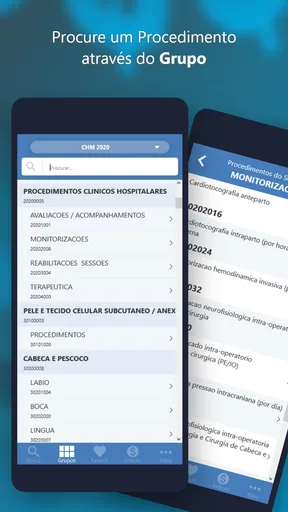
That narrow purpose is also its main strength. Instead of trying to cover appointments, patient records, messaging, billing, and clinical documentation, PMED concentrates on procedure pricing. For someone who regularly needs to check a procedure value, this can be more useful than opening a general calculator or searching through separate reference material. For someone expecting a broad medical office platform, however, its focused design may feel limited.
How PMED feels to use in everyday work
I find PMED most useful when a pricing question interrupts other work and I need to check a procedure without turning the task into a broader search. Its focused purpose can make that moment simpler, but the real benefit depends on how carefully I identify the procedure and its reference table. From there, it helps to consider the everyday workflow that makes a quick lookup dependable.
Readability and navigation come first
The most important accessibility question here is whether the information can be followed quickly. Pricing work is often done between other tasks: while preparing an estimate, answering a colleague, checking a billing question, or reviewing a procedure list. In those moments, a complicated route through unrelated screens would be frustrating. PMED’s purpose gives it a clearer starting point because the user arrives with a specific job in mind: calculate a procedure price or compare reference tables.
I found that this focused approach changes how I think about the app. It is not something I would open casually to explore. I would open it with a code, procedure, or pricing question already in mind. That makes the experience efficient when my information is organized, but less forgiving when I am still trying to identify the correct procedure. A useful habit is to confirm the procedure name and table you intend to use before entering anything. That small preparation reduces the risk of comparing the wrong items simply because their descriptions look similar.
The app is especially relevant to people who work with medical procedure pricing and need a compact reference on a mobile device. It can also help a small clinic worker who does not want to keep a separate printed table beside a desk. The trade-off is that a specialist tool assumes the user understands at least some of the terminology. It supports the calculation task, but it should not be treated as a substitute for learning how the applicable table or procedure classification works.
For users with reading difficulties, dense medical abbreviations can be a bigger obstacle than the arithmetic itself. I would approach each result slowly enough to verify the procedure label, the selected table, and the unit being considered. A quick glance may be enough for a familiar item, but unfamiliar entries deserve a second check. This is one of the places where PMED rewards a careful workflow rather than hurried tapping.
Worth Reading Before You Choose

Flipboard Shows What News Apps Must Do Beyond the Feed

Switching to Android Auto Means Rethinking Your Driving Routine

Google Calendar Makes a Crowded Week Easier to Manage

Ludo King Makes the Most of the Minutes Between Plans

Baby Panda World Brings Quick Play to Modern Phones, but Its Game Library Feels Busy

ESPN’s Live Game View Makes Following Close Games Easier
Motor and sensory considerations
A mobile pricing app needs to work in ordinary, imperfect conditions. I may be holding a phone in one hand, using it at a reception desk, or checking a value while several people are speaking nearby. That makes simple interaction important. PMED’s concentrated purpose means there are fewer unrelated tasks competing for attention, which can help users who become overwhelmed by crowded productivity applications.
At the same time, a focused medical reference is not automatically easy for every user. People with limited fine-motor control may find repeated selection or text entry tiring, particularly when they need to search several procedures in succession. I would recommend using the device’s own accessibility settings, such as larger text or display scaling where supported, and keeping the phone positioned securely rather than trying to operate it while walking or carrying documents.
Users with low vision should not rely on a single visual scan for a billing decision. Medical codes and procedure names can be close enough to cause confusion, and a price that looks plausible is not necessarily the correct price for the intended item. If the device offers text enlargement or screen-reading tools, those may improve comfort, but the practical result still needs human verification. I would be particularly cautious when similar entries appear together or when switching between TUSS and another table.
For users with hearing loss, the app’s core task is naturally less dependent on sound than a communication or appointment app would be. That is a positive in a noisy office or a quiet environment where audio feedback is inconvenient. Users with attention-related difficulties may also appreciate that the app has a specific job. The remaining challenge is maintaining context: before confirming a value, I would say the procedure name and selected table to myself or note them down. That simple verbal or written checkpoint can prevent an otherwise easy-to-miss selection error.
Situational access in clinics, offices, and study settings
One realistic use case is a small clinic preparing an estimate for a patient. A staff member receives a request involving several procedures, opens PMED, checks the relevant entries, and uses the results as part of the estimate discussion. The app can be useful here because the information is available on a phone instead of requiring the person to return to a desktop reference. It does not replace the clinic’s own approval or billing process, but it can shorten the lookup stage.
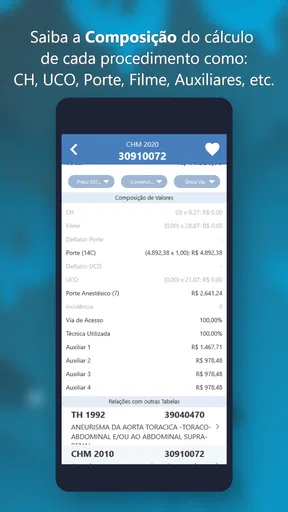
Another scenario is a professional comparing a TUSS reference with another table while reviewing a quotation. This is where the app’s central idea becomes more valuable than a generic calculator. A normal calculator can multiply or add values, but it cannot help organize the reference-table question. PMED is better when the problem is “which table and procedure value should I consult?” rather than simply “what is the result of this arithmetic?”
Students or trainees may also find it useful as a way to become familiar with the practical side of procedure pricing. I would still use it alongside formal instruction, because an app that presents a value does not automatically explain the clinical, administrative, or contractual context behind that value. Its role is strongest as a working reference, not as a complete course in medical billing.
Situational access also includes the device and operating system. The current version is 17.7, and it requires Android 6.0 or later. That makes it suitable for many older Android devices, which matters for clinics that keep a dedicated phone for reference tasks instead of replacing hardware frequently. Before paying, I would check the device’s available screen space and system accessibility settings, because the minimum operating-system requirement alone does not tell me how comfortable the interface will feel on a particular handset.
The app is listed for Everyone, which makes its intended audience broad from an age-rating perspective. That should not be confused with professional suitability for every situation. A young person can encounter the app without age-based restriction, but the medical terminology and pricing decisions are still more appropriate for adults, students, or supervised users who understand what they are reviewing.
Where it compares well with usual alternatives
Compared with a paper table, PMED is easier to carry and potentially faster to consult when the phone is already in hand. Compared with a general spreadsheet, it is more directly aimed at procedure pricing and table comparison. A spreadsheet may be better for building a custom history, adding clinic-specific formulas, or producing a detailed financial report, but it requires more setup and maintenance. PMED makes more sense when the immediate need is a lookup and calculation rather than a full record system.
Compared with a broad medical office application, PMED is less ambitious and therefore easier to judge. It does not need to become the center of every administrative task to be useful. I would choose it for focused reference work, especially if I already have separate tools for patient management and accounting. I would choose a broader platform instead when I need linked patient records, team workflows, reporting, or an audit trail around each estimate.
There is also a difference between PMED and simply searching the web. Online searching can reveal scattered information, but it may take longer to identify the correct table and distinguish a current-looking page from an unsuitable reference. PMED’s value is the attempt to keep this particular task together in one app. Still, I would not assume that a mobile result automatically settles a disputed billing interpretation. For important cases, I would compare the result with the clinic’s official reference process.
Remaining barriers and practical cautions
The first barrier is specialization. If I only need to calculate an occasional personal expense, paying for a medical procedure reference tool would not be a sensible choice. The listed price is $4.99, with in-app purchases ranging from $0.99 to $1.99 per item. That makes the purchase decision more reasonable for people who will use the app repeatedly, but less attractive for someone who needs a single calculation once in a while.
The second barrier is the possibility of confusion between tables. The ability to compare TUSS with other tables is useful, but comparison creates responsibility. A user must know which table applies to the situation and whether the procedure descriptions truly match. I would never copy a number into a patient estimate without checking both the procedure identity and the reference context. The app can make access to values easier; it cannot decide the correct contractual interpretation for me.
The third barrier is workflow continuity. A focused mobile tool may help me find a value, but I may still need to transfer that value into a quotation, spreadsheet, billing system, or message. That extra step can be minor for one procedure and tedious for a long list. If my work involves many entries every day, I would test the complete process before making PMED a central part of the office routine. The app is most convincing when it removes a lookup obstacle, not when I expect it to automate an entire chain of administrative work.
There is also a human-factors issue that deserves attention: speed can encourage overconfidence. Because the task looks numerical, users may assume that a displayed result is self-explanatory. My advice is to keep a short record of the procedure description and table used whenever the value affects a patient-facing estimate. That practice improves traceability even if the app itself is being used only as a quick reference.
Another useful tip is to separate “finding the item” from “accepting the result.” First locate the procedure, then pause and confirm its wording, then check the table, and only afterward use the price in your calculation. This three-step rhythm is slower than tapping through automatically, but it is more inclusive for users who need extra time to read or who are working under distracting conditions. It also protects users who are new to medical pricing from treating the first similar-looking entry as the right one.
Who should use it, and who should skip it?
I would recommend PMED to clinic staff, medical administrators, students of healthcare billing, and professionals who repeatedly need procedure-price references while away from a desktop. It is also a reasonable option for a small practice that wants a dedicated mobile tool without adopting a large office-management suite. The developer, OAZEZ Software & Tecnologia, has kept the product centered on a specific medical pricing task, and that focus is meaningful for the right audience.
I would skip it if I need a patient database, appointment scheduling, invoicing, document storage, or collaborative approval workflow. I would also skip it if I am not familiar with the tables involved and expect the app to explain every billing rule from the beginning. In that case, training material or guidance from an experienced administrator would be more valuable than a standalone calculator.
People who depend on highly customized accessibility workflows should evaluate the app directly on their own device before relying on it professionally. The Everyone rating is reassuring for general availability, but it does not promise that every visual, motor, cognitive, or sensory need will be met. Larger system text may help one person, while another may need stronger contrast, a screen reader, voice input, or a different layout entirely. The right question is not whether the app is universally accessible; it is whether its focused task remains manageable with the tools that person already uses.
My inclusive verdict
PMED - Preço de Procedimento is a practical medical reference app with a clear reason to exist. I like it most when I imagine a real pricing question arriving at a reception desk or during administrative work: instead of opening a general calculator or searching through unrelated material, I can go directly to a tool designed around procedures and table comparisons.
Its inclusive value comes from focus and portability, not from pretending to solve every access need. The app can reduce the number of steps for people who find large office systems confusing, and it works in situations where a desktop reference is inconvenient. On the other hand, medical terminology, similar procedure entries, table selection, and the need to transfer results into another workflow remain genuine barriers.
At $4.99, plus optional in-app items priced from $0.99 to $1.99 each, I see it as a targeted purchase rather than an essential app for everyone. The 10K-plus installs suggest that it has found a specialized audience, while its long presence since August 22, 2012 and its current version show an established product rather than a brand-new experiment. My final advice is simple: if you regularly calculate medical procedures and compare TUSS with other references, PMED is worth considering. If you need a complete, highly customizable, or deeply collaborative healthcare platform, I would look elsewhere and use this kind of focused tool only as a supplementary reference.
Pros
- Helps compare procedure prices before contacting a clinic.
- Useful reference for budgeting medical and aesthetic treatments.
- Simple interface makes price searches quick and accessible.
- May help users identify unusually high or low quoted prices.
- Practical tool for patients researching treatment options independently.
Cons
- Prices may vary significantly by region
- clinic
- and professional.
- Listed values may not reflect the latest market changes.
- Does not replace a personalized quote or medical consultation.
- Limited usefulness outside the regions and procedures it covers.
- Users may misinterpret estimated prices as guaranteed final costs.
FAQs for PMED - Preço de Procedimento
What is PMED - Preço de Procedimento used for?
PMED - Preço de Procedimento is designed to help users check and consult procedure prices in a practical way. It can be useful for people who need quick access to medical, dental, or other healthcare-related pricing references, depending on the database available in the app. Before relying on a listed value, remember that actual prices may vary according to the provider, location, insurance agreement, materials, and complexity of the procedure.
Is PMED - Preço de Procedimento free to download and use?
The application may be available to download at no initial cost, but users should review the information shown on its official store page before installing it. Some versions of apps like this can include optional paid features, subscriptions, advertisements, or access restrictions. It is also worth checking whether the displayed prices or consultation tools require registration, an internet connection, or a specific professional or institutional account.
Are the procedure prices shown in PMED accurate and up to date?
PMED - Preço de Procedimento should be treated as a reference tool rather than a guaranteed quotation. Procedure prices can change frequently because of regional differences, provider policies, inflation, insurance contracts, professional fees, and additional materials or services. After finding a value in the app, contact the clinic, hospital, professional, or responsible organization directly to confirm the current price and what is included.
Does PMED - Preço de Procedimento work offline?
Offline availability may depend on how the app stores its procedure database and how frequently its information is updated. Basic previously loaded content might remain accessible without a connection, while searches, updates, account features, or synchronized data may require internet access. If you plan to use PMED while traveling or in a location with weak connectivity, test the application beforehand and update its data while online.
Is PMED - Preço de Procedimento suitable for patients and healthcare professionals?
The app can be useful for both patients seeking a general pricing reference and professionals who need to consult procedure values more efficiently. However, its usefulness depends on the coverage, terminology, and update frequency of the available database. Patients should not interpret listed prices as medical advice, while professionals should verify whether the information matches their current regulations, contracts, billing standards, and local pricing requirements before using it in practice.


